Clean architecture, code readability and quality assurance will not matter anymore with AI coding.
I regularly read these statements - mostly on X. The main argument is that soon humans do not need to understand code anymore because AI assistants like Claude Code or Codex will be the only ones that will work with the code.
I think most people who go bold on this never ran operation critical software in corporate environments and never had to explain to management why things went so terribly wrong last Friday's deployment.
Even when using AI coding tools for software development, someone is always responsible.
If you ship it and break it: you own it.
I wrote the Laravel Langfuse package in 3 evenings with Claude Code. For vibe-coding standards - the practice of letting AI generate code with minimal human oversight - this is pretty slow. But before AI code assistants this would have taken me 2 weeks. At least.
The reason it took me so "long", was that I not only still apply high quality standards to my code, but that I am convinced that:
Clean architecture, code readability and testability are even more important in the age of AI-assisted software development.
Besides setting clear requirements and doing proper research, putting proper guardrails in your development process is one of the most important aspects of delivering production grade software.
What is guardrailing in software engineering?
Guardrailing in software engineering, means you put automated controls in place to make sure your code is of highest quality.
The most important guardrail is - of course - writing automated tests: preferably before writing any production code.
Writing tests ensures that code works as intended and prevents breaking existing functionality when adding new features.
But tests alone do not check how code is written: You can have perfectly passing tests for a total unreadable and unmaintainable mess.
That is where quality tools like linters, formatters and static analysers come in.
Laravel has great tooling like Pest arch for architecture, Larastan for static analysis and Pint for formatting. Put on top of that PHP Mess Detector for detection of code smells, potential bugs and cyclomatic complexity.
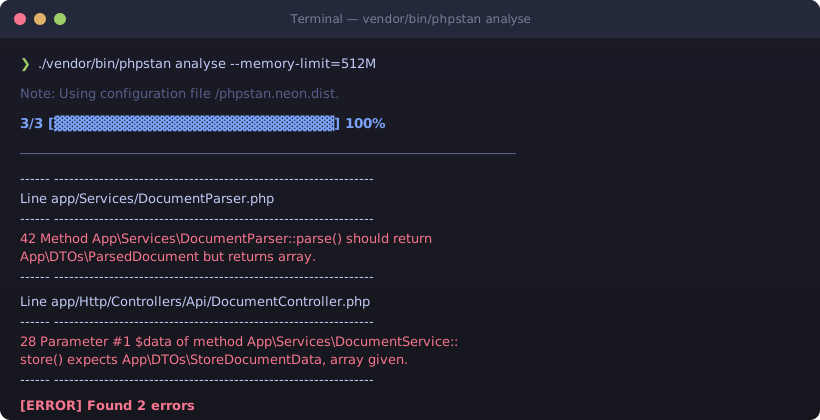
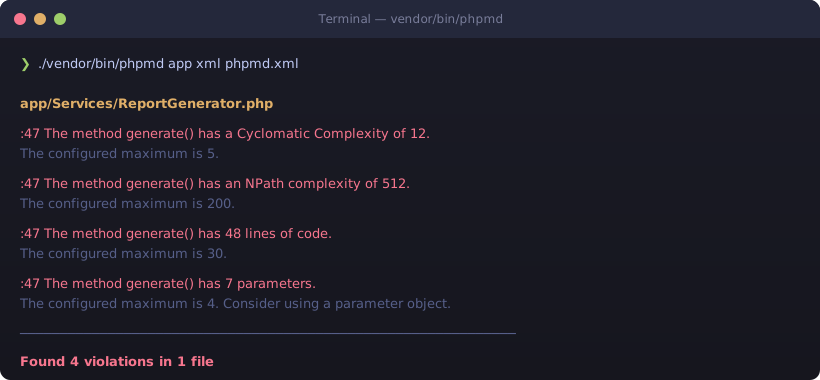
Other languages have similar tools, like Ruff for Python and ESLint, Prettier etc for Javascript: Add them to your workflow and deployment pipelines from the start and thank me later!
There are also guardrails for things outside of your own code, like scanning dependencies for known vulnerabilities. Important, but out of scope for this article. Here we focus on guardrailing the code you - and now your AI assistant - actually write.
The importance of guardrailing development
Using guardrails in software development helps ensuring code is written with consistent formatting, code structure, types and architectural boundaries. They help enforcing architecture decisions so your application is structured in a predictable and logical way. In addition they make sure your code never gets too complex or use obsolete language constructs that are industry acknowledged bad practices.
These guardrails are not just for good looking and readable code: they spot bugs and typing mismatches in an early stage.
Proper guardrails prevent architectural drift and are your insurance policies against technical debt.
Like I wrote earlier: these were important things even before the rise of coding assistants. Especially when working with team: you don't want to discuss indenting and architecture every code review again and again. Enforcing team standards in automated guardrails prevents a lot of frustration when collaborating in teams.
Now when we have a new type of colleagues - who works very fast and is also very clever, but is not always aware of the bigger picture due to context and memory issues, these guardrails make sure speed is not traded in for quality.
Enforcing guardrails in the software development cycle
You want to enforce automated guardrails in software projects as soon as possible. For me this is one of the first things I do when setting up a new project.
You can always do it later - there is no such thing as too late - but it is much easier if everything is correctly setup from the start.
Having all the guardrails in place does not mean anything if you have to run them manually.
Especially when working with a team, you want to make sure every code change is checked against the configured guardrails at all times.
There should be no optionality here.
Luckily enforcing quality guardrails is not that hard nowadays: it just takes a little bit of will and time to set it up.
There are a few ways of enforcing guardrails during the development process, each with their own tradeoff between speed of feedback and strength of enforcement:
- Actions on save in IDE
- AI code assistant hooks
- Pre-commit hooks in GIT
- CI/CD pipelines
Actions on save in IDE
In most editors like PhpStorm and VS Code, you can configure actions to execute each time you save a file. This is the fastest feedback loop you can have: you see issues the moment you hit save.
This is especially helpful for formatters like Pint and linters like PHPMD. You write code, save, and immediately see if something is off.
The tradeoff is that this is the weakest form of enforcement. It is purely local and per-developer. There is no guarantee that every team member has the same actions configured, and there is nothing stopping anyone from ignoring the output.
Still, for your own workflow it is a great first line of defence. It keeps your code clean while you are writing it, instead of finding out later.
AI code assistant hooks
Tools like Claude Code, Codex and GitHub Copilot allow you to execute tasks in hooks, similar to how pre-commit hooks in Git work.
Claude Code for example supports pre and post hooks that run shell commands before or after each AI interaction. Adding guardrail checks in these hooks gives you instant feedback inside the same workflow where the code is being generated.
The AI assistant gets the results immediately and can act on issues as soon as they appear - before you even review the output.
It will cost you a few extra tokens each step, but in my opinion it is worth it. Catching a Larastan error right after generation is cheaper than debugging it later.
A word of caution: I would not recommend running your full test suite in a post hook. It will blow up your token usage dramatically. Keep hooks limited to fast checks like formatting and static analysis. Save the full test runs for your commits and pipeline.
Pre-commit hooks in Git
Pre-commit hooks run automatically every time you make a commit. They catch issues before code ever leaves your machine.
This is where you run your formatters, linters, static analysis and - optionally - a quick test run against the files you changed. If anything fails, the commit is blocked.
Tools like Husky or CaptainHook make it straightforward to set these up and share the configuration with your team through the repository.
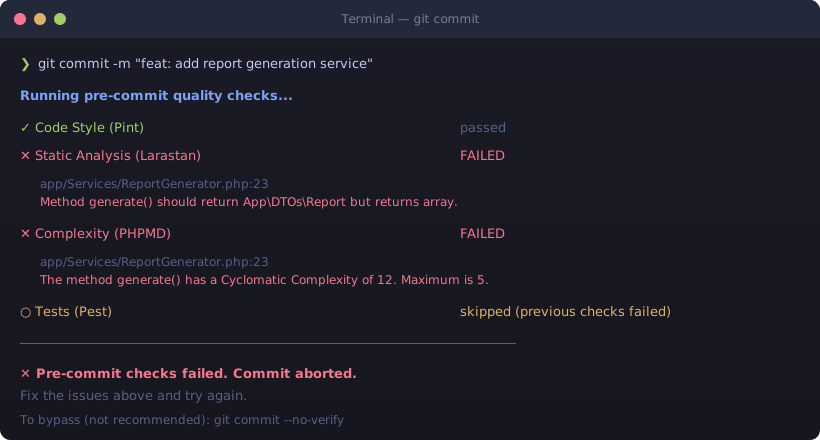
The tradeoff: pre-commit hooks can be bypassed with --no-verify. Every developer knows this flag exists. So while pre-commit hooks are a solid safety net, they are not bulletproof.
CI/CD pipelines
CI/CD pipelines are the process of continuously integrating and delivering software to production. They build the application from source code, run all checks and tests, and create releases for production use.
This is the only true way of enforcing guardrails.
IDE actions, AI hooks and pre-commit checks all depend on individual developer discipline. The CI/CD pipeline does not. It runs on every push, every pull request, and it does not care about --no-verify.
If a guardrail fails in the pipeline, the code does not get merged. No exceptions, no shortcuts.
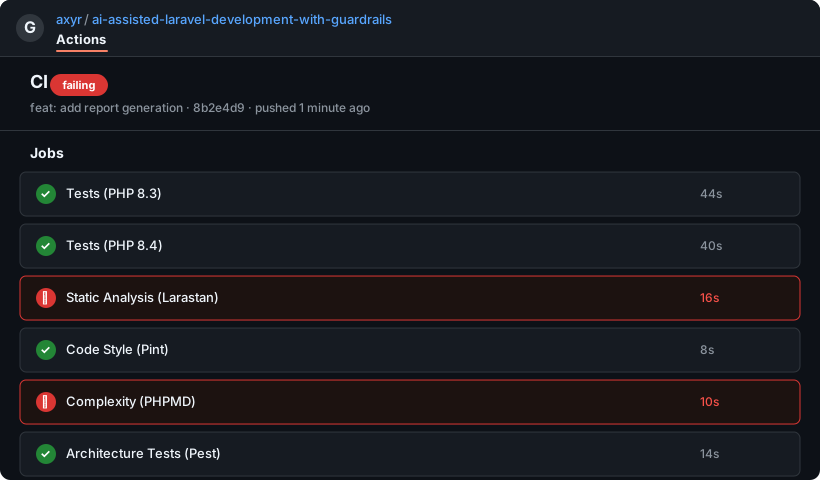
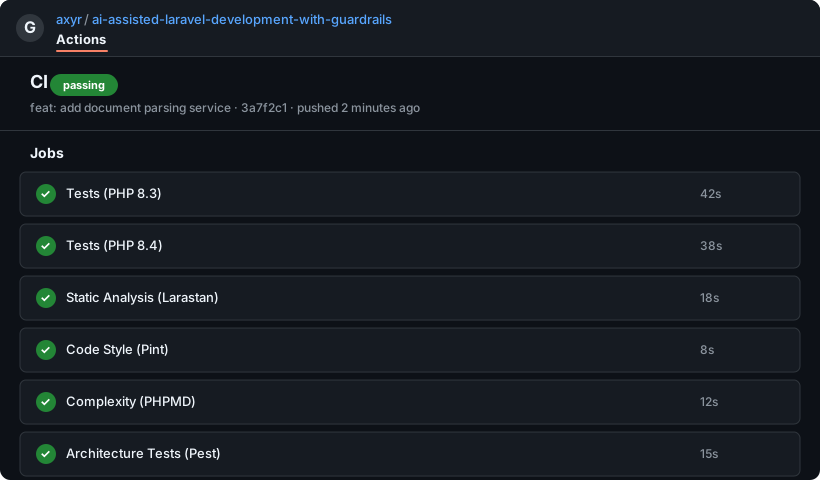
This is your last line of defence and the one that actually matters. Everything before it is about fast feedback and developer experience. The pipeline is about enforcement.
The most important guardrail
Is still you.
I read every line of code before anything is committed to the repository.
I can not count the times that Claude wrapped a piece of code in a try/catch block, because it decided a coding task or debugging session took too long.
Claude might still favour writing functionality from scratch that already exists somewhere else.
All automated guardrails will pass, but sometimes it is clear something is completely wrong just by looking at it. That is why you - even in the era of AI - still want to produce readable code.
Yes, setting up good (system) prompts can help, but never 100% prevent.
Setting up automated guardrails improves code quality and development time dramatically.
But if you are serious about your production environment, you will have to check what your assistant has generated for you.
Summary
I have set up a demo repository that demonstrates all of these concepts with a working Laravel project, including Pint, Larastan, PHPMD, Pest and GitHub Actions:
github.com/axyr/ai-assisted-laravel-development-with-guardrails
AI-assisted development is not so different from old-fashioned software engineering. The processes and tools that make good code great are still extremely relevant.
Using - automated - quality tools was already a good thing to do before AI coding assistants existed.
Now when using AI for coding they are - or should be - a first concern when setting up a new project.
Yes, now everyone can vibe code an application in an hour. But the developers who ship reliable software are the ones who guardrail their process:
Before, during, and after AI touches the code.